
Google Tag Manager done rightfor WordPress
A WordPress-native GTM integration built for production sites. Standard GA4 events, WooCommerce e-commerce, and server-side ready. Plus a Template Assistant that generates your GTM container so you don’t have to.
TRACK ONCE, SEND TO
Why GTM Kit
One setup. Every channel. Cleaner data.
Standard GA4 events, WooCommerce e-commerce, and server-side support in one well-maintained plugin.
TRACK ONCE, SEND EVERYWHERE
One dataLayer, every destination
GTM Kit emits the standard GA4 dataLayer. Anything you wire up in GTM reads the same clean events: analytics, ad platforms, social pixels, server-side endpoints.
Configure once in GTM. Done.
WOOCOMMERCE
Full e-commerce tracking, out of the box
Every GA4 e-commerce event you need out of the box. WooCommerce-native, web + server-side, no extra wiring.
Identical payloads, web + server-side
SERVER-SIDE
Better ROAS, better data quality
First-class support for server-side GTM containers. Cleaner attribution, ad-block resilience, and complete data across every connected platform.
Optimize profit
Template Assistant
Ready-to-import GTM containers, generated to fit your stack.
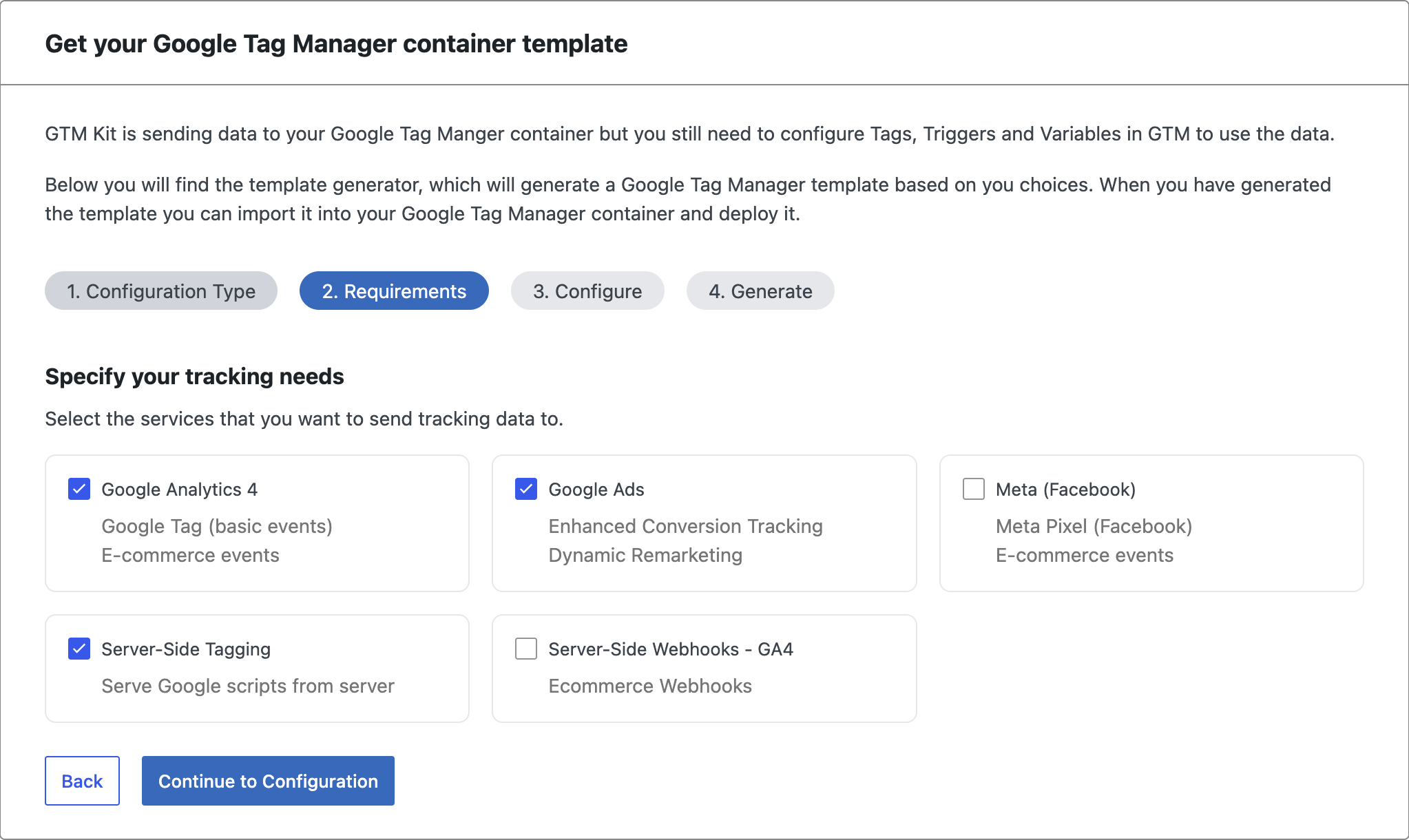
Most plugins ship the dataLayer and leave you to build the GTM container yourself. GTM Kit generates it for you. Pick your stack, paste your IDs, download a JSON template, import into Google Tag Manager. Web and server-side, both supported.
-
01
Configuration
E-commerce or lead generation. Standard GTM or server-side GTM. The assistant adapts the rest to match.
-
02
Requirements
Pick the destinations you actually use: GA4, Google Ads, Meta, Server-Side Tagging. Only what you need.
-
03
Configure
Drop in your IDs once: server container URL, GA4 measurement ID, the rest. Edit any time in GTM.
-
04
Generate
Download a web template and a server template. Import into GTM. Done.
What’s inside
Built for production sites that need to ship.
Six features that make the difference between “tracking is hooked up” and “the data is actually usable.”
Standard GA4 events
Page views, scroll depth, form submit, file download, link click. The dataLayer you'd build by hand, ready out of the box.
WooCommerce e-commerce
The full GA4 e-commerce event set, identical payloads on web and server-side. Plus add_to_wishlist, refund, order_paid, and subscription_started on Premium. See the full event list below.
Server-side tagging support
First-class support for server-side GTM containers. Cleaner attribution, ad-block resilience, and complete data across every connected platform.
WP Consent API integration Premium
Reads consent from the WordPress Consent API. Complianz, CookieYes, Real Cookie Banner, Borlabs, Termly — honored with no per-CMP code.
WordPress + WooCommerce blocks
Full tracking on the WordPress block editor and WooCommerce's block-based cart and checkout. Block-based stores fire the same events as classic templates.
Cache-safe by design
Per-visitor logic stays client-side, so the plugin works under Cloudflare, Varnish, WP Rocket, LiteSpeed. No cached-HTML drift, no stale dataLayer.
Supported events
Every GA4 event the plugin pushes to your dataLayer.
Standard GA4 events plus the full WooCommerce e-commerce set out of the box. Advanced commerce events on Premium.
| Event | Free | Premium |
|---|---|---|
| Search | ||
search | ||
| Account | ||
login | ||
sign_up | ||
user_data | ||
| WooCommerce e-commerce | ||
view_item_list | ||
view_item | ||
select_item | ||
add_to_cart | ||
view_cart | ||
remove_from_cart | ||
begin_checkout | ||
add_shipping_info | ||
add_payment_info | ||
purchase | ||
add_to_wishlist | ||
refund | ||
order_paid | ||
order_processing | ||
order_completed | ||
order_refunded | ||
subscription_started | ||
Common questions
Still have questions? Contact us for direct help.
What's the difference between the free and premium versions?
GTM Kit (free) installs Google Tag Manager on your WordPress site and fires the standard GA4 dataLayer events (page views, scroll, form submit, file download). GTM Kit Premium adds WooCommerce ecommerce tracking, server-side tagging support, a custom event builder, and priority email support.
Can I upgrade from free to premium later?
Yes. Buy Premium any time, paste the license key into the existing plugin, and the Premium-only features unlock. No data migration, no re-tagging.
What happens when my Premium subscription expires?
Your sites keep working. Premium features stop receiving updates, but everything you already configured continues to fire. Renew any time to reactivate updates and support.
Do I need technical knowledge to use GTM Kit?
If you can install a WordPress plugin and have a GTM container ID, you can use GTM Kit. The standard events fire automatically. Custom events require some familiarity with the GTM interface.
Is GTM Kit GDPR compliant?
GTM Kit doesn’t collect any analytics data itself, it sends events to your own GTM container. Consent gating is built in.
Ship better tracking by Friday.
Install the free plugin from WordPress.org. Run the Template Assistant. Import the generated container into GTM. You're tracking properly before the week is out.